Graffity: A Retro-Inspired Font for Modern Design Workflows
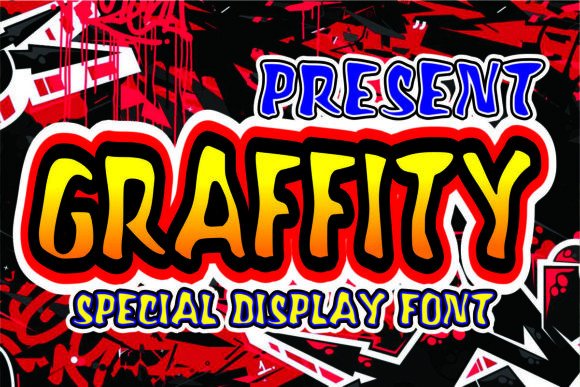
Fonts are more than just a visual element—they shape the tone, clarity, and impact of any design. Graffity is a modern font that draws inspiration from retro aesthetics while maintaining a clean, versatile structure. Its smooth, rounded corners and subtle character give it a timeless appeal that works well in both digital and print environments. Whether you're designing logos, shirts, or promotional materials, integrating Graffity into your workflow can add a unique touch without overwhelming the overall composition.
What Is Graffity?
Graffity is a display font characterized by its retro roots and contemporary feel. It blends the boldness of vintage typography with a refined, easy-to-read form. The rounded edges and balanced spacing make it approachable yet distinctive, perfect for catching attention without being too flashy. Unlike many fonts that lean heavily on ornate details, Graffity maintains a minimalist profile, which allows it to stand out while still complementing other design elements seamlessly.
This font is especially useful in branding projects where a nostalgic vibe is desired but needs to remain professional. It’s ideal for applications such as logo creation, t-shirt designs, social media visuals, packaging, and even event posters. Its adaptability makes it a great choice for designers who want to blend classic charm with modern functionality.
Using Graffity Before, During, and After a Project
Incorporating Graffity into your creative process requires strategic planning depending on the stage of your project. Here's how it can be used effectively throughout different phases:
Before the Project Begins: Planning and Concept Development
During the initial brainstorming phase, consider whether Graffity aligns with your brand identity or project theme. For instance, if you're launching a vintage-inspired clothing line or a retro-themed coffee shop, using Graffity early on can help establish a cohesive visual language. You might also use it in mood boards or concept sketches to visualize how the font will fit within the broader design scheme.
- Brand alignment: Match Graffity with your brand’s personality—whether it's playful, elegant, or minimalist.
- Design direction: Use it as a reference point when choosing colors, layouts, and imagery that complement its style.
- Client presentations: Include Graffity in early proposals to communicate the intended aesthetic clearly.
During the Project: Execution and Integration
Once the project moves into the execution phase, Graffity becomes a key asset in bringing your ideas to life. In graphic design software like Adobe Illustrator or Photoshop, you can layer this font over background textures or photographs to create visually engaging compositions. Its retro essence pairs well with distressed effects, muted color palettes, or hand-drawn illustrations.
For web designers or developers, Graffity can enhance user interfaces when applied sparingly. Think of using it for call-to-action buttons, headers, or section titles where a bit of character is needed without sacrificing readability. When embedding the font on a website, ensure it's optimized for fast loading times by using WOFF or WOFF2 formats.
Workflow tip: Always test Graffity across multiple devices and screen sizes during development. This ensures consistency and usability, particularly in responsive designs where typography plays a critical role in user experience.
After the Project: Refinement and Long-Term Use
Post-production is where the value of Graffity truly shines. Once a design is finalized, applying Graffity can help maintain a consistent look across all marketing channels. For example, after creating a logo with Graffity, you can use it for signage, product labels, and even customer-facing documents to reinforce brand recognition.
If you're an entrepreneur or small business owner, think about how Graffity can become part of your long-term branding strategy. From storefront displays to email signatures, the font adds a subtle yet impactful touch that helps your brand stand out in a crowded market. Regularly revisit its usage to ensure it remains relevant and aligned with evolving design trends.
How Graffity Interacts with Other Design Elements
A successful design isn’t built on a single element—it's about harmony between fonts, colors, images, and layout. Graffity works best when paired with complementary typefaces and assets. For example, you could use it alongside a sans-serif font for body text to balance retro flair with clean readability.
When selecting colors, avoid high-contrast combinations that might clash with Graffity’s soft curves. Muted tones like mustard yellow, olive green, or pastel blue often work well to highlight the font's subtlety. If you’re working with photos, try placing Graffity text over faded or grainy textures to enhance the vintage effect.
Additionally, consider how Graffity interacts with tools like Canva, Figma, or Procreate. These platforms support custom font uploads, making it easy to integrate Graffity into your digital or mobile design workflows. Just remember to keep your layers organized and name files appropriately for easier revisions and collaboration with others.
Practical Tips for Implementing Graffity
Here are some actionable tips to help you implement Graffity efficiently in your projects:
- Use in key focal points: Apply Graffity to headlines, logos, or taglines where it can draw attention without being overused.
- Test at scale: Check how the font looks when scaled up (for billboards) or down (for small print or mobile screens).
- Pair with simple backgrounds: Let the font breathe by using solid colors, gradients, or minimalistic patterns.
- Balance contrast: Ensure legibility by adjusting the font size, weight, and spacing according to the background and context.
- Store and organize: Save Graffity in a dedicated folder within your design resource library for quick access.
Another consideration is licensing. Make sure you have the correct permissions to use Graffity in commercial projects, especially if you plan to apply it in merchandise like t-shirts or branded apparel. Many free fonts come with restrictions, so always review the terms before finalizing your use case.
Real-World Workflow Examples with Graffity
Let’s explore a few scenarios where Graffity fits naturally into real-world design workflows:
Example 1: Logo and Merchandise Design
You’re tasked with creating a new logo for a retro-style record store. Start by sketching out a few concepts that reflect nostalgia. Choose Graffity for the primary logo text due to its smooth, retro curves. Pair it with a warm orange gradient and a slightly aged paper texture for added authenticity. Once the logo is approved, apply the same font to merchandise such as band tees or vinyl packaging to maintain a unified brand presence.
Example 2: Social Media Campaigns
For a summer campaign promoting a vintage-themed restaurant, use Graffity in social media posts to evoke a sense of timelessness. Create a series of Instagram stories with short phrases like “Retro Eats” or “Classic Vibes,” styled in Graffity with a sepia-toned filter. This creates a cohesive visual thread across platforms, helping followers recognize and connect with the brand’s identity.
Example 3: Print Materials and Packaging
When designing packaging for a new artisanal soap line, choose Graffity for the product names. The font’s gentle curves lend themselves well to natural, handmade aesthetics. Add leaf motifs and earthy tones to complete the look. Then, use the same font in printed brochures or packaging inserts to maintain a seamless design language from product to promotion.
Factors to Consider When Using Graffity
To maximize the effectiveness of Graffity in your designs, keep these factors in mind:
- Preparation: Understand the purpose of each design piece and how Graffity supports your message.
- Compatibility: Confirm that the font works well with your chosen platform and export settings.
- Usability: Prioritize legibility, especially in smaller sizes or low-resolution prints.
- Organization: Keep font-related assets in a centralized location for easy access and version control.
- Efficiency: Avoid overcomplicating your design with too many effects; let the font speak for itself.
- Consistency: Use Graffity in similar contexts across all branding materials to build a recognizable style.
- Quality control: Proofread text carefully to ensure there are no errors once the font is applied.
- Long-term use: Evaluate whether Graffity remains appropriate as your brand or project evolves.
Why Graffity Works for Productivity-Minded Users
While Graffity is primarily a design tool, it can also serve productivity-minded users. Educators might use it in presentation slides to introduce historical topics or themes in a more engaging way. Bloggers and content creators can incorporate it into headings or infographics to break up text and guide readers through complex information with ease.
Freelancers and entrepreneurs benefit from its versatility, using it in client proposals, invoices, or portfolio sites to add a personal, creative edge. The font’s clean lines and retro charm allow it to convey professionalism while still feeling fresh and original.
For marketers, Graffity can be a valuable component of campaigns targeting millennials and Gen X audiences. These groups often appreciate nostalgic aesthetics, and using a font like Graffity can subtly tap into that sentiment. Whether it’s for a limited-edition product launch or a seasonal sale, the right typography can elevate the entire message.
Getting Started with Graffity
Ready to start using Graffity? Here’s a streamlined approach to get you going:
- Download the font: Acquire the Graffity font file from a trusted source and install it on your system.
- Select the right tool: Open your preferred design software and select Graffity from the font menu.
- Experiment with styles: Try different weights or apply subtle effects like drop shadows or outlines to match your design needs.
- Review on various surfaces: Test the font on mockups such as t-shirts, posters, or websites to see how it translates across mediums.
- Get feedback: Share drafts with colleagues or clients to gauge how well the font supports your message and design goals.
Remember, the best results come from thoughtful application rather than random placement. Take time to understand how Graffity functions in different environments and what makes it shine in specific use cases.
Final Thoughts on Integrating Graffity
Graffity offers a unique blend of retro inspiration and modern simplicity. By understanding its characteristics and how it fits into your creative or business processes, you can leverage it to enhance your visual communication. Whether you're refining a logo, crafting a shirt design, or building a brand identity, this font provides a subtle yet effective way to stand out.
As with any design element, the key to success lies in knowing when and how to use it. Focus on integration, not isolation—pair Graffity with supporting visuals, colors, and layouts that amplify its strengths. Over time, you’ll find that it becomes a reliable part of your toolkit, helping you deliver high-quality, impactful designs that resonate with your audience.