Why Funroot Is the Perfect Display Font for Halloween and Beyond
Fonts play a crucial role in design, shaping how messages are perceived and adding personality to visual content. When it comes to creating something that stands out — especially around Halloween — choosing the right font can make all the difference. Enter Funroot, a display font that balances spooky aesthetics with playful charm. Whether you're designing posters, invitations, or digital graphics, this font brings a unique flair that’s both eye-catching and thematically appropriate.
The Mysterious and Playful Aesthetic of Funroot
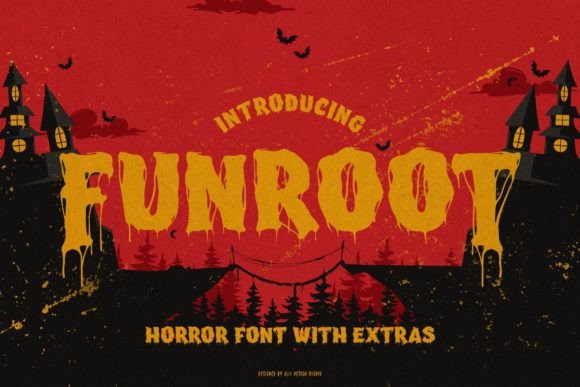
At first glance, Funroot might seem like just another Halloween font, but its character goes deeper than seasonal themes. The typeface features exaggerated letterforms, whimsical ligatures, and an overall vibe that feels like stepping into a haunted forest where every shadow has a smile. This blend of mystery and fun makes it stand out from more traditional horror-themed fonts that lean too heavily on fear or darkness.
Each glyph in Funroot is crafted with attention to detail, ensuring that even the most intricate letters remain legible while maintaining their artistic integrity. The font doesn't sacrifice readability for style, making it suitable for short phrases, headlines, and even longer text when used appropriately. It's not a font you'd use for body copy, but it shines in display settings where impact matters most.
PUA Encoding: A Designer’s Best Friend
One of the standout technical features of Funroot is its PUA (Private Use Area) encoding. For those unfamiliar, PUA encoding allows for the inclusion of special glyphs and ligatures that go beyond standard keyboard characters. This means that with just a few clicks, you can access unique symbols and alternate characters without needing to manually install additional tools or plugins.
This feature is particularly valuable for designers who want to add extra flair to their projects. Instead of spending time layering images or using multiple fonts to achieve a cohesive look, Funroot gives you everything you need within one package. From ghostly accents to eerie punctuation marks, the PUA-encoded elements open up creative possibilities that enhance your design process significantly.
Where to Use Funroot in Your Projects
Display fonts like Funroot are ideal for use in areas where large text commands attention. Here are some practical applications:
- Halloween Party Invitations: Add a spooky yet fun twist to your event invites with custom greetings or titles in Funroot.
- Poster Design: Use the font for headers or taglines to create an engaging focal point.
- Branding and Merchandise: If you’re running a themed business or selling Halloween-related products, Funroot can become part of your brand identity.
- Digital Content: From website headers to social media posts, this font works well across digital platforms when paired with complementary styles.
Because of its bold and expressive nature, Funroot is best suited for short bursts of text rather than long paragraphs. However, with thoughtful pairing and layout, it can be integrated into multi-font designs effectively.
Pairing Funroot with Other Fonts
To keep your design balanced, consider pairing Funroot with a more readable sans-serif or serif font. A classic choice might be Montserrat or Roboto for body text, allowing Funroot to serve as the headline. This contrast ensures that your message remains clear while still capturing the fun and spooky essence of the theme.
If you're aiming for a more cohesive look, you could also explore other display or decorative fonts that share similar characteristics. Look for options that maintain a slightly mystical or hand-drawn feel to match the tone of Funroot without overwhelming the reader.
Practical Benefits of Using Funroot
Choosing the right font isn’t just about looks; it’s also about usability and adaptability. Here are a few reasons why Funroot is a great addition to any designer’s toolkit:
- High Visual Impact: Funroot grabs attention immediately. Its distinct shape and playful details make it perfect for headlines, logos, and other key design elements.
- Flexible Applications: While it’s a Halloween favorite, the font can be repurposed creatively for other occasions — think fantasy events, vintage-inspired branding, or even children's book covers.
- Easy Access to Special Characters: Thanks to PUA encoding, accessing alternate glyphs and ligatures is straightforward, speeding up your workflow and reducing the need for image overlays.
- Customizable Style: With OpenType features, you can tweak the font to suit different moods and contexts. Adjust spacing, add alternate characters, or stylize specific words for added emphasis.
How Funroot Fits Into Modern Design Workflows
In today’s fast-paced design world, efficiency is key. Funroot supports modern workflows by being compatible with popular design software like Adobe Photoshop, Illustrator, InDesign, and Figma. Once installed, it integrates seamlessly, allowing you to focus on creativity rather than technical hurdles.
Moreover, since it’s available in various formats such as TTF and OTF, it’s easy to download and start using almost instantly. Many designers prefer OTF files for their advanced typographic features, which Funroot delivers in full force. You don’t need to be a typography expert to benefit from these enhancements — they work automatically within supported programs.
Things to Consider Before Choosing Funroot
While Funroot is a powerful tool for many design scenarios, there are a few things to keep in mind before incorporating it into your project:
- Legibility: As with all display fonts, Funroot may not be the best choice for small text sizes or dense paragraphs. Always test how it looks at different scales.
- Color and Contrast: To highlight its mysterious vibe, pair it with dark backgrounds and light text. Alternatively, use glowing colors or gradients for a magical effect.
- Brand Alignment: Ensure the font aligns with your brand’s tone. If your brand is professional or minimalist, Funroot might not fit unless used sparingly for special promotions.
- File Size and Performance: Since Funroot includes numerous glyphs and ligatures, the file size might be larger than simpler fonts. Be mindful of performance if you're working on web-based projects.
By understanding these factors, you can better determine whether Funroot is the right choice for your needs. Remember, the goal is to enhance your message — not obscure it.
Real-World Examples of Funroot in Action
Let’s take a look at how Funroot can be used in real-world scenarios:
- A café launching a Halloween menu uses Funroot for its promotional banners, drawing customers in with a sense of playful intrigue.
- A children's book author selects Funroot for chapter headings and title pages, giving the storybook a whimsical, adventurous feel.
- An e-commerce site selling spooky décor adds the font to product listings and landing pages to create a cohesive and immersive shopping experience.
- A social media manager uses Funroot for Instagram posts during October, boosting engagement with visually striking content that resonates with followers.
These examples show that Funroot is versatile beyond just print materials. It adapts well to digital environments, helping you create memorable visuals that speak directly to your audience.
Getting Started with Funroot
Ready to bring some spookiness and fun into your next design? Here’s how to get started:
- Download Funroot from a trusted font marketplace or provider.
- Install the font on your computer following standard procedures for your operating system.
- Open your preferred design software and select Funroot from the font dropdown menu.
- Experiment with the PUA-encoded glyphs by opening the glyph panel in your application (usually found under Window > Glyphs in Adobe apps).
- Adjust spacing, color, and effects to match your project’s aesthetic.
With just these steps, you can begin transforming your designs. Don’t forget to save a backup of the font file in case of system issues or when moving between devices.
Pro Tips for Maximizing Funroot’s Potential
Here are a few tips to help you make the most of this unique font:
- Layer Text with Effects: Try adding subtle shadows, glows, or textures to enhance the mysterious vibe of Funroot.
- Use Ligatures Sparingly: While the ligatures are charming, overusing them can reduce clarity. Use them where they’ll have the biggest visual impact.
- Combine with Illustrations: Funroot pairs beautifully with hand-drawn illustrations or SVG elements that complement its whimsical style.
- Test Across Devices: Make sure the font displays correctly on different screens and browsers, especially if it’s going live online.
By applying these strategies, you can ensure your design not only looks great but also functions well across platforms.
Final Thoughts on Funroot for Halloween and Creative Projects
Font selection is often overlooked, but it plays a vital role in the success of any visual project. Funroot stands out because it offers a rare combination of spooky elegance and playful energy. It’s not just for Halloween — though it definitely excels there — but for any project where you want to add a touch of mystery and whimsy.
Whether you're a seasoned designer or just starting out, having a font like Funroot in your collection can elevate your work. Its accessibility through PUA encoding, compatibility with major design tools, and broad stylistic appeal make it a must-have for anyone looking to create engaging, thematic content.
So, the next time you're brainstorming a Halloween design or anything that needs a little magic and mystery, remember Funroot. It’s more than just a font — it’s a creative spark waiting to illuminate your next project.