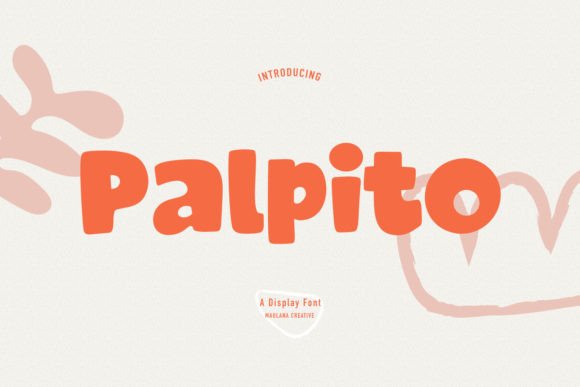
Palpito: A Playful Font for Expressive Design
Fonts play a crucial role in how we communicate visually, and choosing the right one can elevate your message from ordinary to unforgettable. Palpito is a casual yet quirky handwritten display font that brings an element of warmth and charm to any design. With its friendly curves and expressive strokes, it’s perfect for projects that need a personal touch or a lighthearted vibe. Whether you're creating content for kids, branding a creative business, or designing eye-catching marketing materials, Palpito offers a unique aesthetic that stands out without being over the top.
What Makes Palpito Unique?
At first glance, Palpito feels like a natural extension of handwriting—like a note passed between friends or a doodle on a napkin. It’s not just about the look; it's about the feeling it evokes. The font has a conversational tone, making it feel approachable and easy to read despite its playful nature. Its characters are slightly irregular, with variations in stroke width and slant that mimic real human writing. This adds character and authenticity to digital or printed text, which is often missing in more formal typefaces.
A Versatile Tool for Creative Expression
Palpito’s versatility lies in its balance between whimsy and readability. While it may not be suitable for long blocks of body text due to its decorative style, it shines in headlines, titles, logos, and short bursts of messaging. The font works well in both uppercase and lowercase forms, allowing designers to experiment with different visual effects. Because it’s a display font, it’s best used where legibility isn't the only priority—think posters, greeting cards, social media graphics, and packaging labels.
Real-World Applications of Palpito
One of the biggest strengths of Palpito is its adaptability across various industries and mediums. Let’s explore some practical use cases where this font can make a difference:
- Children’s Crafts and Education: Palpito is ideal for educational materials aimed at younger audiences. Its cheerful appearance can help reduce anxiety around learning and make reading or instruction feel more engaging. Teachers and educators might use it in classroom decorations, flashcards, or interactive activities.
- Cartoon and Illustration Projects: If you're working on animated characters, storyboards, or comic books, Palpito can add personality to speech bubbles or title sequences. It complements hand-drawn visuals beautifully and gives a sense of spontaneity that aligns with the artistic medium.
- Branding and Marketing: Startups and small businesses looking to build a brand identity around fun, creativity, or community will find Palpito incredibly useful. It can be incorporated into logo designs, taglines, or promotional banners to create a memorable impression.
- Digital Content Creation: Bloggers, YouTubers, and Instagrammers can leverage Palpito to craft attention-grabbing thumbnails or post headers. In a sea of generic sans-serif fonts, using something as distinctive as Palpito can increase click-through rates and user engagement.
- Event and Poster Design: From birthday parties to music festivals, Palpito brings a sense of joy and excitement to event invitations and posters. Its informal style makes it especially effective for themed events like family reunions, kid-friendly workshops, or pop-up art shows.
Why Use Palpito in Your Branding?
In today’s fast-paced digital world, brands are constantly vying for attention. A strong visual identity helps you stand out, and Palpito can be a key part of that strategy. When used appropriately, it communicates a sense of authenticity and approachability. For example, a boutique toy store could pair Palpito with bright colors and playful illustrations to instantly convey their target audience and values.
Consider how this font aligns with your brand voice. If your business thrives on creativity, community, or a laid-back vibe, Palpito can reinforce that image. However, if your brand is more professional or corporate, it might not be the best fit. Always choose typography that reflects your core message and resonates with your audience.
Design Tips for Working with Palpito
To get the most out of Palpito, consider these best practices when integrating it into your designs:
- Use it Sparingly: Since Palpito is a display font, it should be reserved for accents, headlines, or call-to-action phrases rather than large bodies of text. Overusing it can lead to readability issues and a cluttered design.
- Pair with Complementary Fonts: To maintain balance in your layout, pair Palpito with a clean, modern sans-serif or serif font for supporting text. This contrast helps guide the reader’s eye and ensures clarity.
- Adjust Color and Size Thoughtfully: Palpito’s quirkiness becomes even more pronounced with color. Try using soft pastels for a gentle effect or bold hues to make it pop. Also, adjust the size based on the context—larger sizes work better in print or signage, while smaller versions suit digital interfaces.
- Test Across Devices: Ensure that Palpito renders clearly on different platforms and screen sizes. Some characters may appear less defined on mobile devices, so always preview your designs before finalizing them.
Where to Download and How to Install Palpito
If you’re ready to bring Palpito into your workflow, you’ll find it available on several popular font marketplaces. These include sites like Adobe Fonts, Google Fonts (if supported), and independent platforms such as Creative Market or MyFonts. Once downloaded, installing the font is usually straightforward—simply double-click the .ttf or .otf file and follow the prompts to install it on your computer or mobile device.
For web developers and designers, embedding Palpito on a website requires linking to the font via CSS. Make sure to check licensing terms before doing so, especially if you plan to use it publicly or commercially. Many font providers offer self-hosting options or require attribution depending on the license type.
When Not to Use Palpito
While Palpito is a fantastic tool for many applications, it’s important to recognize its limitations. Avoid using it in situations where readability is paramount, such as legal documents, academic papers, or instructional manuals. Its stylized form may also clash with minimalist or ultra-modern design aesthetics, so use your discretion based on the project’s overall style.
Another consideration is language support. Depending on the version you download, Palpito may not include extended character sets for non-Latin scripts or special symbols. Always review the font’s features to ensure it meets your needs before committing to a design project.
Palpito in Print vs. Digital Media
The performance of Palpito varies slightly between print and digital formats. On paper, the font maintains its charm but benefits from high-resolution printing to preserve the details of each character. In digital environments, particularly on screens, you may want to increase the weight or simplify the background to prevent the text from blending in.
Print designers often use Palpito in combination with textures or watercolor backgrounds to enhance its organic feel. Digital creators, on the other hand, might apply subtle animations or gradients to make it more dynamic. Either way, the goal is to highlight the font’s friendliness while ensuring it remains legible and purposeful.
Final Thoughts and Recommendations
Palpito is more than just a font—it’s a design statement. When used thoughtfully, it can transform a standard layout into something vibrant and engaging. As a designer or content creator, your choice of typography influences everything from brand perception to user interaction. Palpito offers a fresh alternative for those seeking to inject a bit of personality into their work without compromising professionalism.
I recommend experimenting with Palpito in low-stakes projects first, like mockups or sample designs, to see how it fits within your existing style. Once you’ve mastered its application, you can confidently incorporate it into more critical projects. Just remember to keep it balanced and intentional—let the font serve your message, not overshadow it.