Thin Fox: A Versatile Display Font with Natural Elegance
Typography plays a vital role in visual communication. Whether you're designing a logo, creating marketing materials, or crafting a wedding invitation, the right font can elevate your project from ordinary to extraordinary. That’s where Thin Fox comes in — a display font that combines the charm of natural handwriting with a polished, versatile design. In this article, we’ll explore what makes Thin Fox stand out and how you can avoid common pitfalls when choosing and using it for your creative work.
What Is Thin Fox?
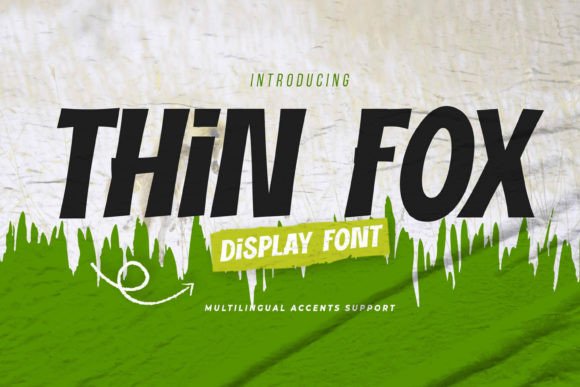
Thin Fox is a textured, hand-drawn-style display font known for its elegance and authenticity. It features subtle imperfections that mimic real-life handwriting, giving your text a warm, organic feel while maintaining a clean and readable structure. This balance between casual and classy makes it perfect for branding, invitations, posters, packaging, and more.
Designed for both digital and print use, Thin Fox supports multiple platforms including Adobe Illustrator, Photoshop, InDesign, and even Microsoft Word. Its multilingual capabilities ensure that your message reaches a global audience without compromising on style. The font is available in OpenType (.otf) and TrueType (.ttf) formats, offering flexibility and ease of installation across PCs and Macs.
Why Choose Thin Fox for Your Projects?
- Handwriting Feel: Adds a personal touch to any design, making it ideal for logos, quotes, and branding elements.
- Textured Style: Gives depth and character to your text, enhancing visual appeal without being over the top.
- Classy and Clear: Despite its handwritten appearance, Thin Fox maintains readability and sophistication, suitable for professional settings.
- Dramatic Movement: The fluidity and dynamic strokes make it expressive and engaging, especially in large-scale designs like posters and headers.
- PUA Encoded Characters: Includes special glyphs such as ligatures and alternate characters, all accessible without needing advanced software.
Common Mistakes When Choosing a Display Font
Display fonts are powerful tools, but they require thoughtful application. Many designers fall into the trap of selecting a font based solely on aesthetics without considering how it functions in different contexts. Here are some mistakes to watch out for when choosing a font like Thin Fox:
1. Ignoring Readability in Smaller Sizes
One of the biggest missteps is using a display font like Thin Fox for body text. While it shines in headlines and logos, its delicate details may become hard to read at smaller sizes. Always test how the font looks in various scales before finalizing your layout.
Better Approach:
- Use Thin Fox primarily for titles, headers, and short phrases.
- Pair it with a complementary sans-serif or serif font for body content to maintain clarity and flow.
2. Overlooking Multilingual Support
If your project targets an international audience, it's crucial to verify that the font supports the necessary languages. Not all display fonts offer this, which could lead to awkward spacing or missing characters.
Better Approach:
- Check the font specifications (like those included with Thin Fox) to confirm language coverage.
- Preview the font in the target language before committing to it in your design.
How to Avoid Design Pitfalls When Using Thin Fox
Even with a great font like Thin Fox, poor implementation can ruin your design. Let’s look at some practical tips to help you get the most out of it.
1. Don’t Rely Solely on Visual Previews
Many users see a beautiful preview image and assume the font will look the same in their project. However, the background images and vectors used in previews are often not included with the font file. What works in one context might not translate well to another.
Better Approach:
- Test the font in your actual design environment (e.g., Illustrator or Photoshop).
- Experiment with spacing, leading, and alignment to ensure it fits seamlessly into your layout.
2. Misusing PUA Encoding
Thin Fox includes PUA-encoded characters, which allow access to special glyphs and ligatures. But if you’re not familiar with how these work, you might miss out on the full potential of the font.
Better Approach:
- Open the font in a glyph viewer within your design software to explore all available characters.
- Consider using the Character Map utility on Windows or Font Book on macOS to navigate PUA-encoded options easily.
Before You Buy or Download Thin Fox
To make sure Thin Fox is the right fit for your needs, consider the following factors before purchasing or downloading:
- Project Type: Will it be used for print, web, or video? Thin Fox works well for print and static web graphics, but may need adjustments for responsive web use.
- Software Compatibility: Ensure your design software supports the font format you choose. Fortunately, Thin Fox is compatible with major programs like Adobe Suite and Microsoft Office.
- Usage Rights: Check the licensing terms. Some fonts restrict commercial use or require attribution — always review the fine print.
- Installation Simplicity: Thin Fox is designed for simple setup, but if you're new to installing fonts, follow the included instructions carefully to avoid technical issues.
Real-World Applications of Thin Fox
Let’s walk through a few examples to illustrate how Thin Fox can enhance your creative output:
Example 1: Logo Design
A local bakery wants a modern yet approachable logo. By using Thin Fox, they create a logotype that feels handcrafted and welcoming, perfectly aligning with their brand identity. The texture adds warmth, and the dramatic movement gives the logo a sense of motion and energy.
Example 2: Wedding Invitations
A designer is tasked with creating elegant wedding invites. They choose Thin Fox for the main title and names, then pair it with a clean sans-serif for the event details. The combination strikes the perfect balance between romantic and professional, impressing the clients and ensuring easy reading for guests.
Example 3: Product Packaging
A skincare company aims to market a line of luxury products. They incorporate Thin Fox into the product label for the brand name, giving it a soft, artisanal vibe. The font helps communicate the product’s handmade quality and attention to detail.
Thin Fox vs. Other Handwritten Fonts
While many handwritten fonts exist, Thin Fox distinguishes itself by maintaining a structured form despite its organic appearance. Some alternatives may appear too loose or inconsistent, risking professionalism. Thin Fox avoids this by offering a clear baseline and consistent stroke width, allowing it to blend naturally into both minimalist and bold designs.
Another key difference is its accessibility. Unlike fonts that require plugins or specialized tools to access alternate characters, Thin Fox uses PUA encoding to give you full control without extra steps.
Final Thoughts on Thin Fox
In the world of typography, finding a font that balances beauty and functionality isn’t always easy. Thin Fox bridges that gap by delivering a natural, stylish aesthetic that doesn’t sacrifice usability. Whether you're a beginner experimenting with your first logo or a seasoned designer looking for a fresh take on hand-drawn type, Thin Fox offers a reliable and inspiring option.
Before integrating it into your next project, remember to test it in your intended context, understand its limitations, and explore all its features. With these considerations in mind, you'll avoid common traps and unlock the full potential of Thin Fox.
Cheers to better design choices and clearer communication. Thank you for considering Thin Fox — let it bring a little more personality to your work.